Stop juggling.
Start thinking.
Codicle is the canvas where your notes, sketches and live code blocks live together — and connect. No more switching between your IDE, notebook and docs.
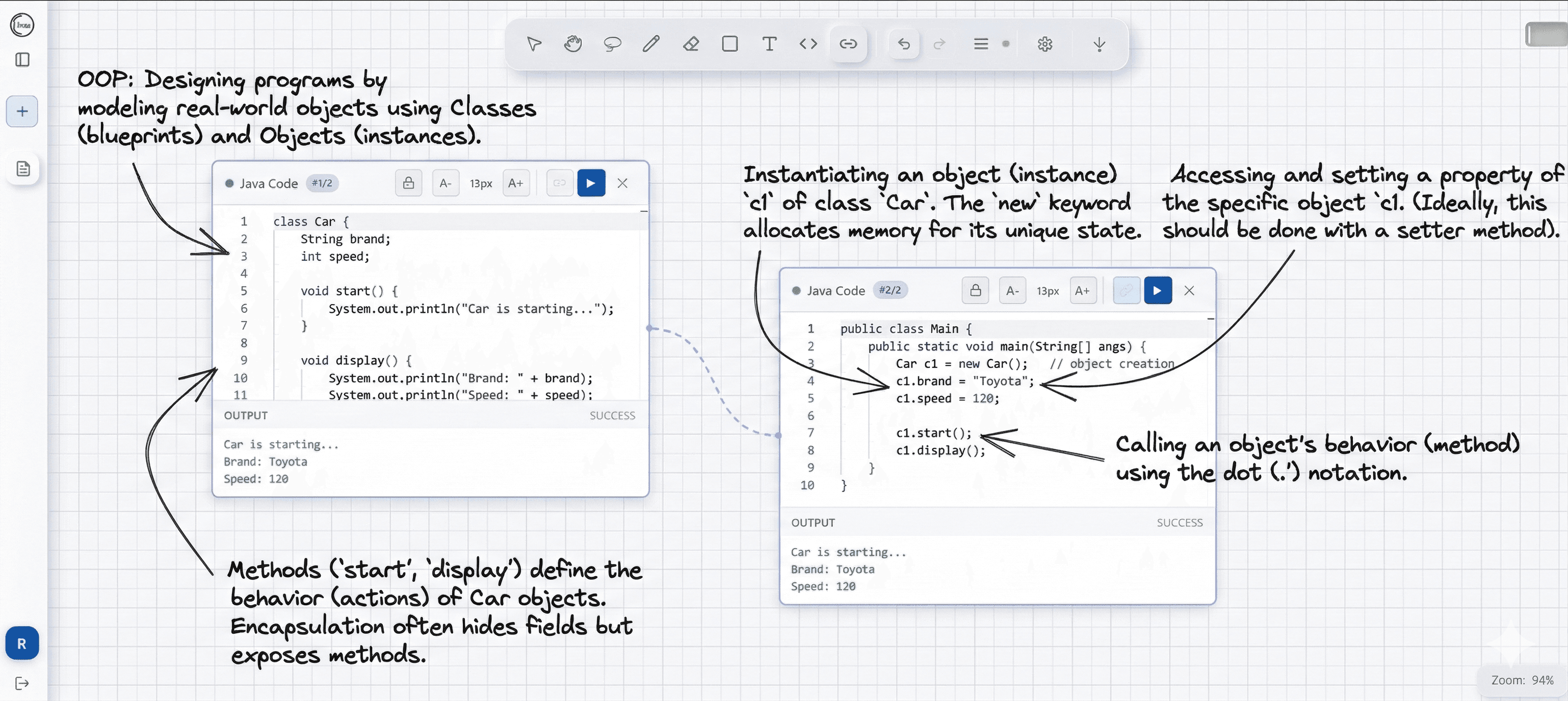
Your ideas deserve better
than five open tabs
You write a note in Notion, sketch a diagram in Miro, run experiments in Jupyter, and keep your thoughts in a text file. By the time you need everything together — it's all lost.
A canvas that thinks
the way you do
Write notes as moveable blocks. Sketch freely. Rearrange your thinking spatially. Codicle's infinite canvas is as flexible as a whiteboard and as structured as a notebook.
- Infinite zoomable canvas — no scroll limits, no page breaks
- Text, heading, checkbox, image, drawing and code blocks
- Drag and reorder freely — spatial layout is part of your thinking
- Rich text formatting with @mentions and [[wikilinks]]
- Templates for lectures, design docs, research journals
Place code anywhere.
Run it right there.
Drop a code block next to the note it belongs to. Run Python, JavaScript, SQL or Bash inline. Output lands beside the block, in context, right where you need it.
- Python, JS, TypeScript, SQL, Bash — all sandboxed server-side
- Inline charts, tables and diffs rendered from your output
- AI code assist that understands your canvas context
- Package installation with a single comment — # pip: numpy
- No setup — every canvas is a live environment out of the box
Link any block
to any other
Draw arrows between notes, code blocks, sketches and diagrams. Build concept maps, flow-charts and dependency graphs — your notes become a living knowledge graph.
- One-drag connector between any two blocks
- Arrow labels to describe the relationship
- Auto-routing around other blocks as you move things
- Export connections as Mermaid diagrams or JSON graph
- Visual query — highlight all blocks connected to one node
Every feature, built for focus
Codicle's four pillars work together so your workflow never leaves the canvas.
- Infinite canvasWrite, draw and annotate anywhere on an infinite zoomable canvas — no page limits.
- Block-based notesEvery idea is a moveable block: text, heading, checkbox, image or sketch.
- Linked referencesReference any note or block from anywhere else on the canvas.
Built for every kind of thinker
Lecture notes that actually make sense
Capture ideas spatially — annotate lecture diagrams, run code examples from class, and link concepts across subjects, all on one living canvas.
Try it free
Teach concepts that actually click
Draw diagrams, run live code examples and annotate everything right on the canvas — so students follow along without switching between a dozen tools.
Try it free
Design, explore and document — together
Sketch system diagrams, embed live API call scripts next to service nodes, and leave architectural decision notes directly on the canvas for your team.
Try it free
Start free. Think better forever.
No paywalls on the core experience. Upgrade when your team needs it.
- 1 canvas
- max 5 links to code blocks
- 5 code runs per day
- 100 MB storage
- Community support
- Everything in Starter
- Unlimited canvases
- All runtimes
- SVG export
- 20 GB storage
- Unlimited code links
- Priority support
- Everything in Free
- max 50 links to code blocks
- max 40 code runs per day
- 300 MB storage
One canvas.
Every idea connected.
Open Codicle in seconds. No install, no setup — just an infinite canvas waiting for your first block.